
Who is Maru for?
- Not for big companies. For people who run their work with a few others or on their own.
- Agency, studio, small shop or freelance: the trouble is the same. Work scatters across messages, notes and people’s heads.
- Below, see how Maru fits each way of working.
Which one fits you?
When you first open Maru Hub, you pick the kind of work you do. The card name, starter columns and modules follow; you can change it later in Settings.
-
Agencies and creative teams
- Card name
- Task
- Starter columns
- 8
- Stands out
- Brand teams, team schedule, stages
- Suggested plan
- Agency, ₺999/mo
-
Studios and artists
- Card name
- Piece
- Starter columns
- 6
- Stands out
- Kiln, materials, workshops, students
- Suggested plan
- Team, ₺549/mo
-
Small businesses
- Card name
- Task
- Starter columns
- 5
- Stands out
- Team schedule, roles and permissions
- Suggested plan
- Team, ₺549/mo
-
People working on their own
- Card name
- Task
- Starter columns
- 4
- Stands out
- A board without team setup, and your day plan
- Suggested plan
- Personal, ₺149/mo
Agency edition
Agencies and creative teams.
Small teams with a designer, a copywriter and a project lead, working for several brands at once.
Sound familiar?
- Revisions live in email, chat and meeting notes, and nobody is sure which version is the latest.
- You find out who works on which brand, and how much is on their plate, by asking around.
- Files go back and forth for approval, and the client’s “OK” ends up at the bottom of a thread.

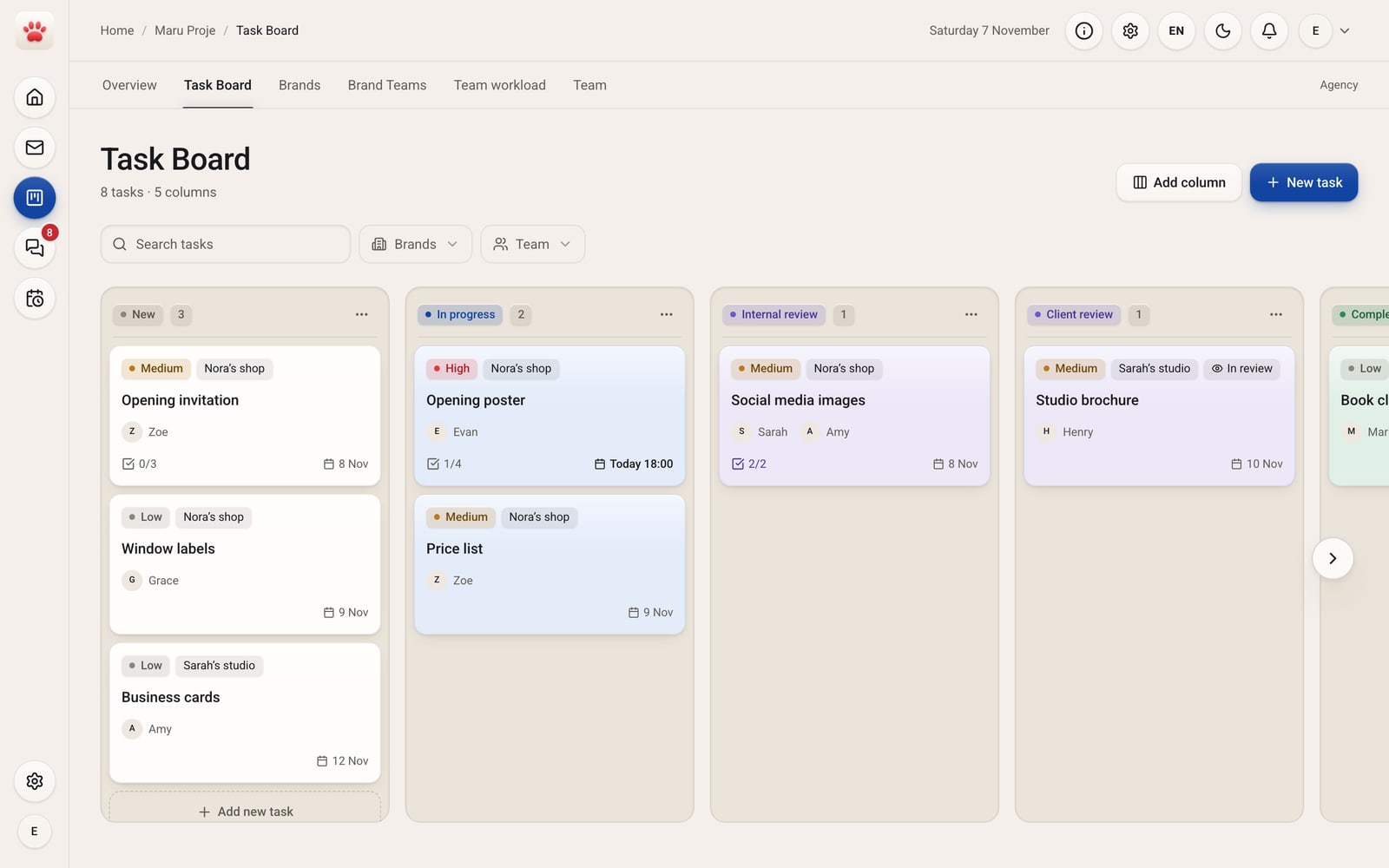
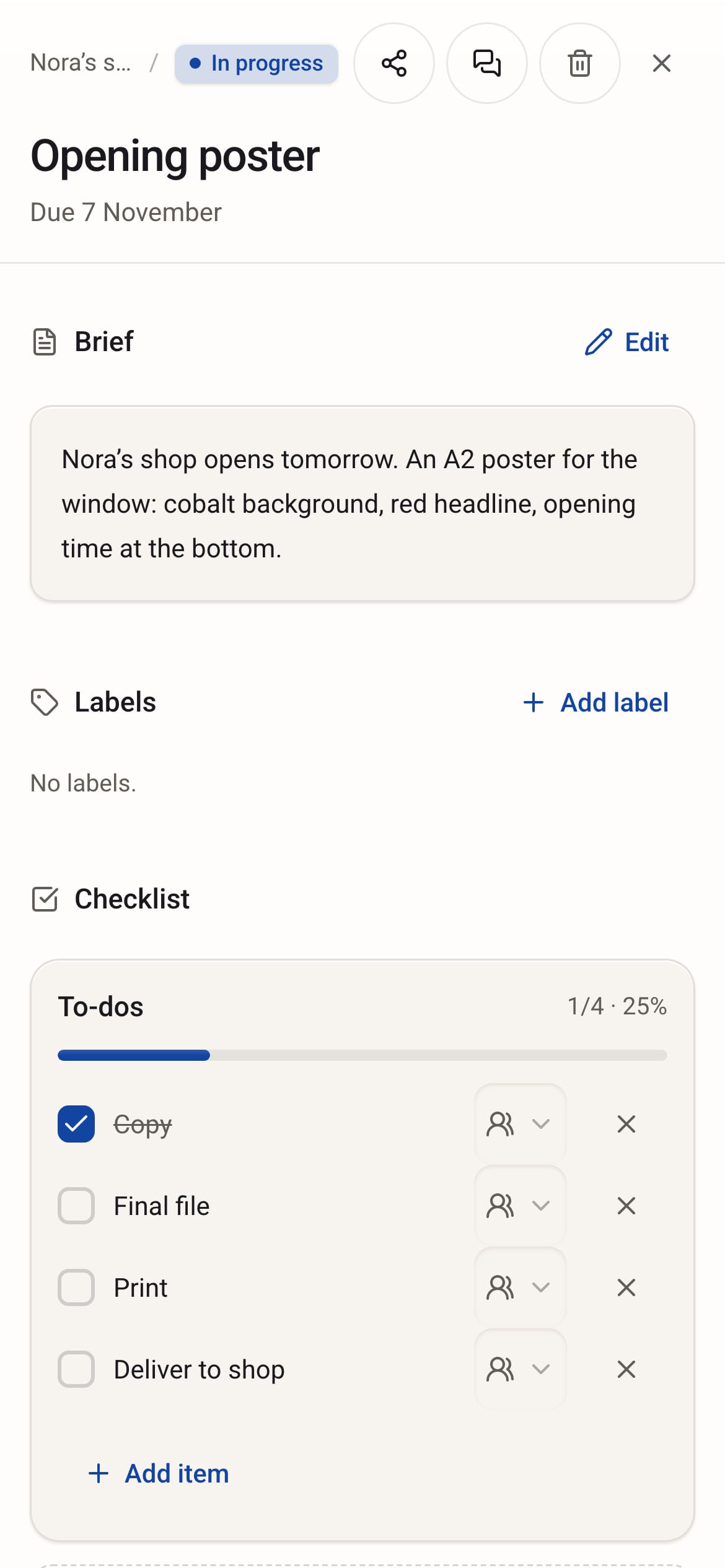
What you get in Maru Hub
Words in the app
- Card
- Task
- People
- Brands
- Board
- Task Board
Starter columns
- New
- In progress
- Revisions
- On hold
- Internal review
- Client review
- Sent
- Completed
Only in this edition
- Brand teams See the team assigned to each brand in one table.
- Team schedule Who is working on what, and when, by day, week or month.
- Stages and effort A task is split into stages; one person finishes and hands off, and time is logged.
- Client portal Your client approves or requests changes from a link, with no account.
- Logo and colors Each brand’s logo and colors sit on its own card.
A day with Maru Hub
- 9:30
Claire adds the new brief to New and assigns the poster to Evan.
- 12:00
Evan uploads the first draft to the card, and it moves to Internal review.
- 15:00
Claire approves and sends it to the client, who opens the link and requests changes.
- 17:30
Zoe finishes the changes, the client approves, and Claire moves the task to Sent.
Suggested plan
Agency ₺999/mo
excl. VAT
5 people included. Brand Teams, team workload, approval flows and stages come with this plan.
Questions
Does my client need an account?
No. When you send a task to your client, a link is created. Your client opens it, then approves or requests changes.
Can I change the columns?
Yes. Add, rename or delete columns. The starter columns are only a starting point.
Studio edition
Studios and artists.
Ceramic and art studios that make pieces, take orders and run classes, and independent makers.
Sound familiar?
- You can’t tell which piece is drying and which is waiting for the kiln without checking the shelf.
- You notice the clay or glaze is gone only when it runs out, and an order stalls.
- Class sign-ups, attendance and session dates are in a notebook, a phone and a dozen messages.

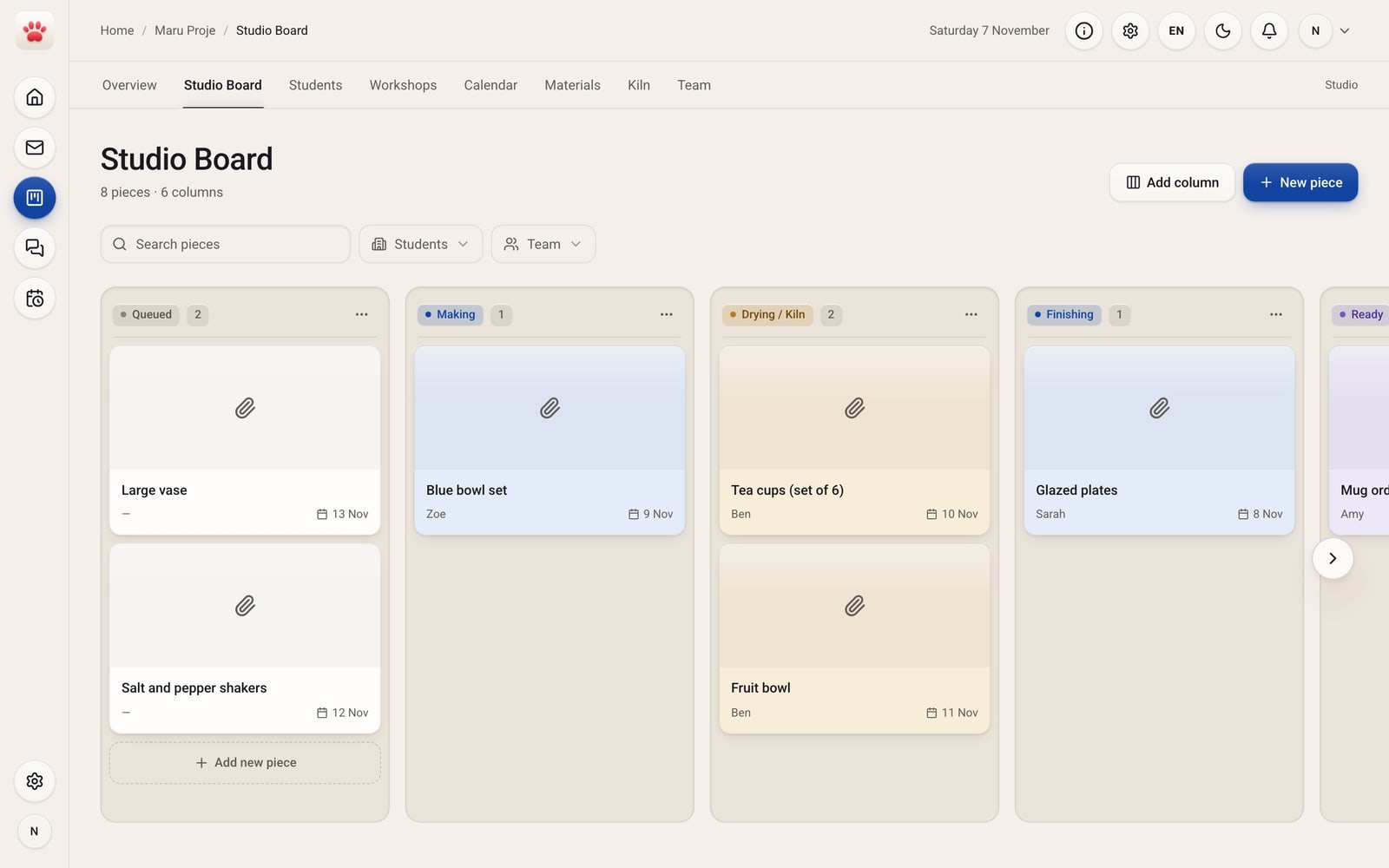
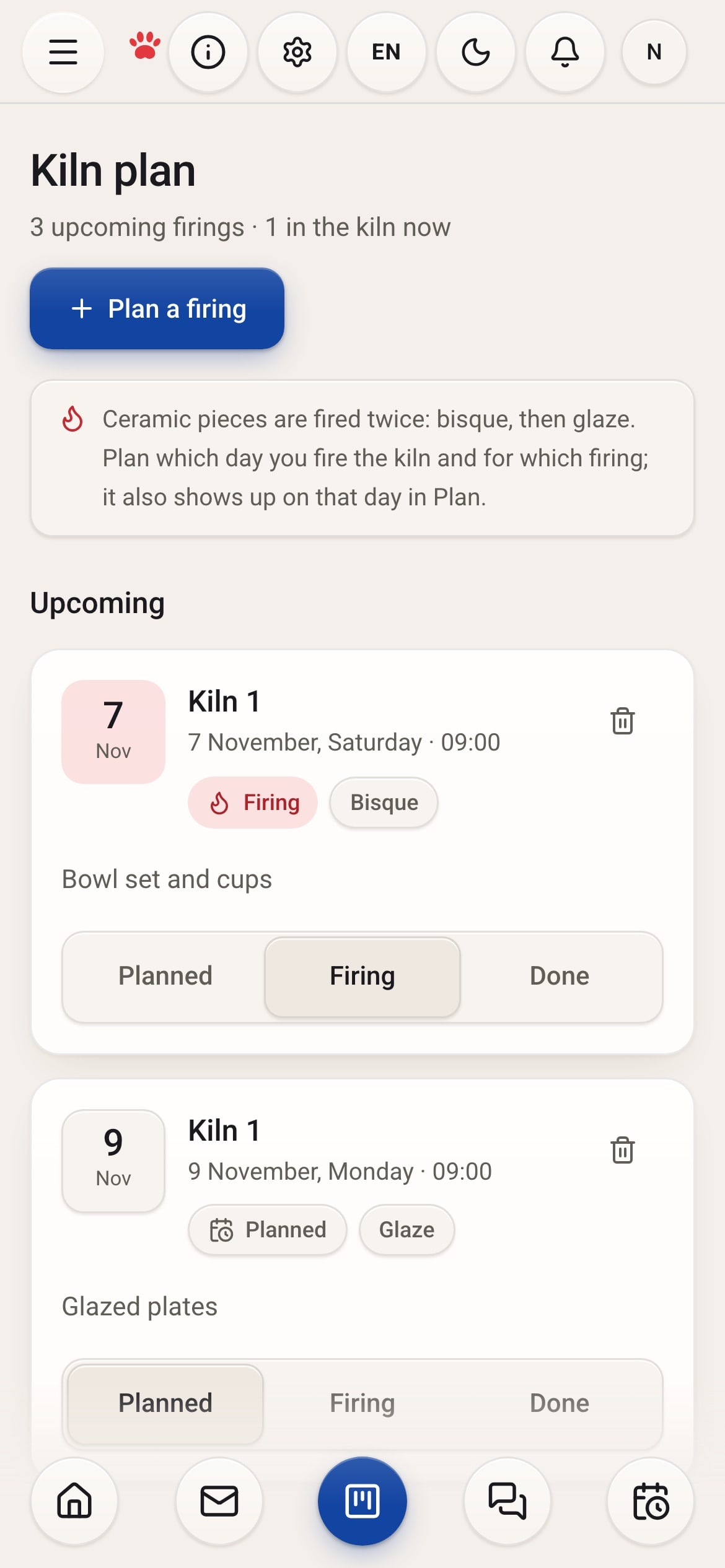
What you get in Maru Hub
Words in the app
- Card
- Piece
- People
- Students
- Board
- Studio Board
Starter columns
- Queued
- Making
- Drying / Kiln
- Finishing
- Ready
- Delivered
Only in this edition
- Kiln Put bisque and glaze firings on a day; they move from Planned to Firing to Done and show up in Plan that day.
- Materials Clay, glaze and supplies in stock; anything below its minimum stands out.
- Workshops Open a class, add sessions, enroll students and take attendance here.
- Calendar The weekly session plan on one screen.
- Students A name is enough; phone and notes are optional. Pieces and enrollments link to the student.
- Picture cards On the board, each piece sits on a small card with its photo.
A day with Maru Hub
- 9:00
Ellie moves today’s bisque firing to Firing in Kiln.
- 10:00
Nora takes attendance for the pottery class in Workshops.
- 14:00
Henry moves the blue bowl set to Drying / Kiln.
- 17:00
Ellie sees in Materials that the clear glaze is low and adds the order to her plan.
Suggested plan
Team ₺549/mo
excl. VAT
5 people included, extra person ₺79/mo. Spaces, direct messages and task chats, 50 GB shared storage.
Questions
Why does it say “students” instead of “clients”?
The Studio edition calls people students, because workshop enrollment and attendance are about them. You can link pieces to a student too.
Does the kiln plan show up in Plan?
Yes. A firing you schedule also appears on that day in Maru Plan.
Business edition
Small businesses.
A shop, a small workshop, a consultancy or a software team: a few people sharing the same jobs every day.
Sound familiar?
- Tasks are handed out by word of mouth, and who took what only becomes clear by evening.
- The same question comes up three times a day: did the parcel go out, was the quote sent?
- When someone is off, nobody knows where their work stands.

What you get in Maru Hub
Words in the app
- Card
- Task
- People
- Clients
- Board
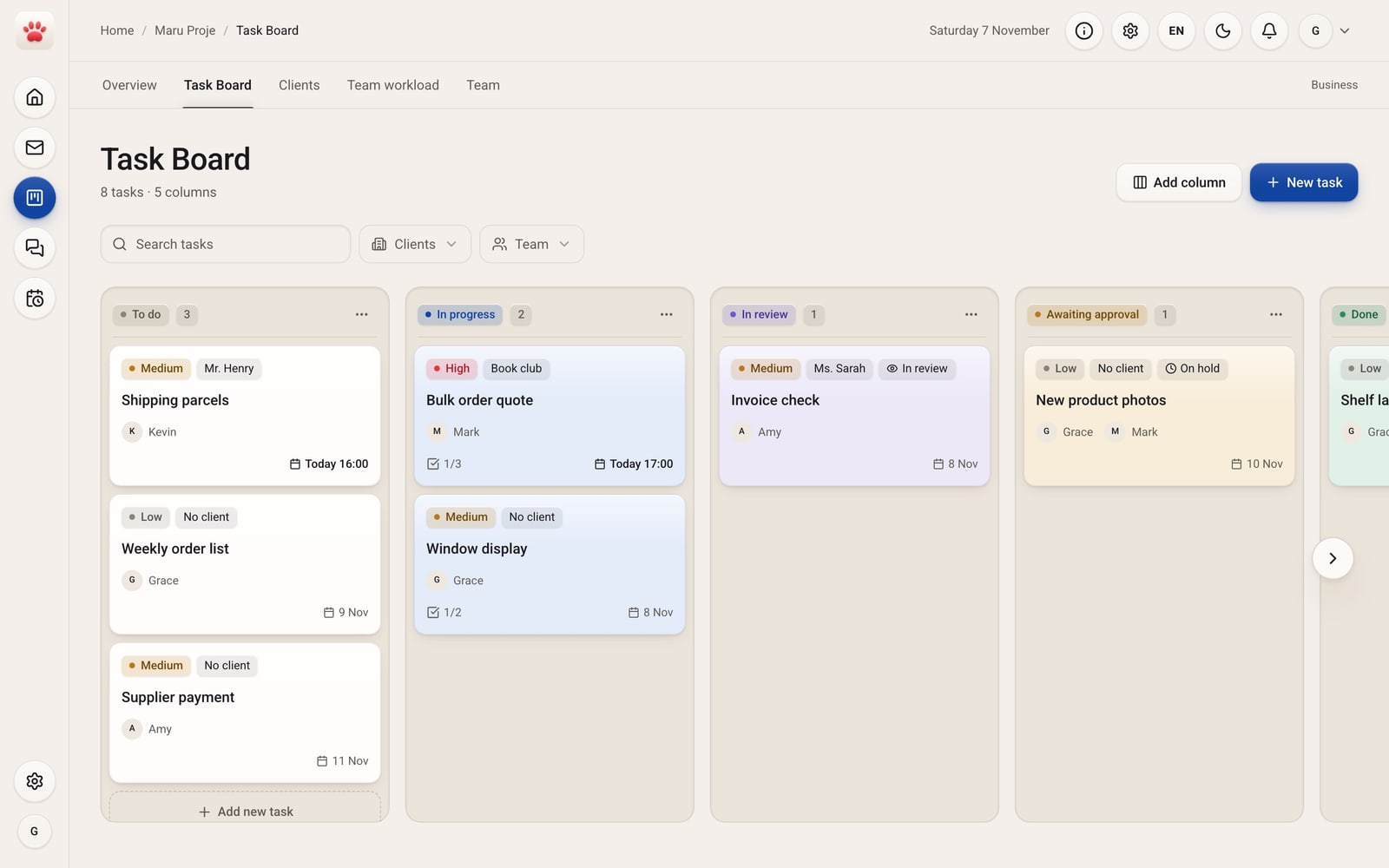
- Task Board
Starter columns
- To do
- In progress
- In review
- Awaiting approval
- Done
Only in this edition
- Task Board A simple board: task, owner, due date and checklist.
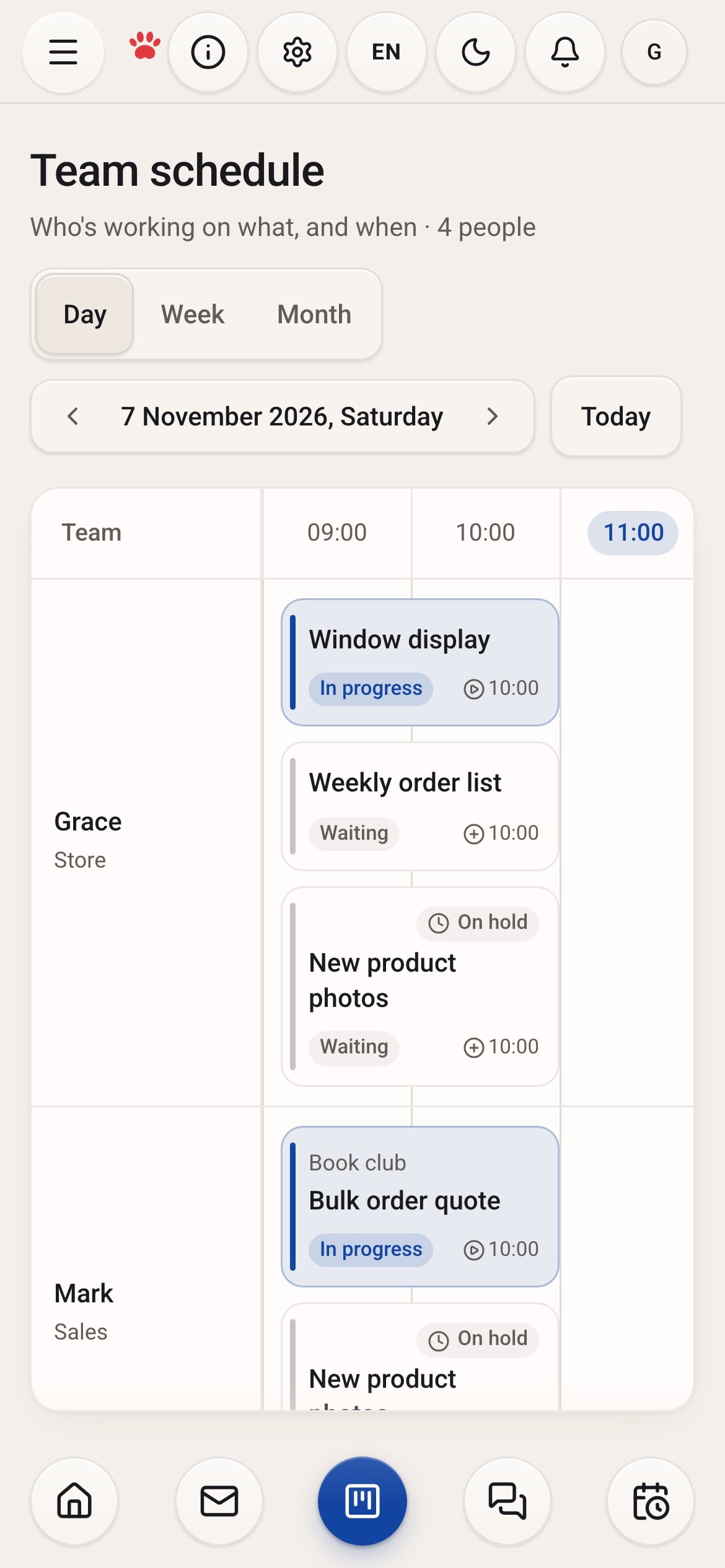
- Team schedule Who is working on which task, and when, by day, week or month.
- Team and roles Invite people and give them a title and permissions: Sales, Store, Delivery, Accounting.
- Client portal Your client approves from a link, with no account.
A day with Maru Hub
- 9:00
Grace assigns today’s shipping parcels to Kevin.
- 11:30
Mark checks off “Prices” on the bulk order quote.
- 15:00
Amy moves the invoice check to In review.
- 18:00
Grace looks at the team schedule and sees who has what tomorrow.
Suggested plan
Team ₺549/mo
excl. VAT
5 people included, extra person ₺79/mo. Client portal and 50 GB shared storage.
Questions
How many people are in the Team plan?
5 people are included. Each extra person is ₺79 a month, excl. VAT.
Can everyone edit every task?
With roles and permissions, you decide who can edit what.
Personal edition
People working on their own.
Freelance designers, consultants, writers and photographers: anyone who runs their work alone.
Sound familiar?
- Deadlines live in your head; when one slips, the rest slip with it.
- To see what’s waiting with which client, you dig back through your email.
- Your day plan is in one place and your work in another, and the two never meet.

What you get in Maru Hub
Words in the app
- Card
- Task
- People
- Clients
- Board
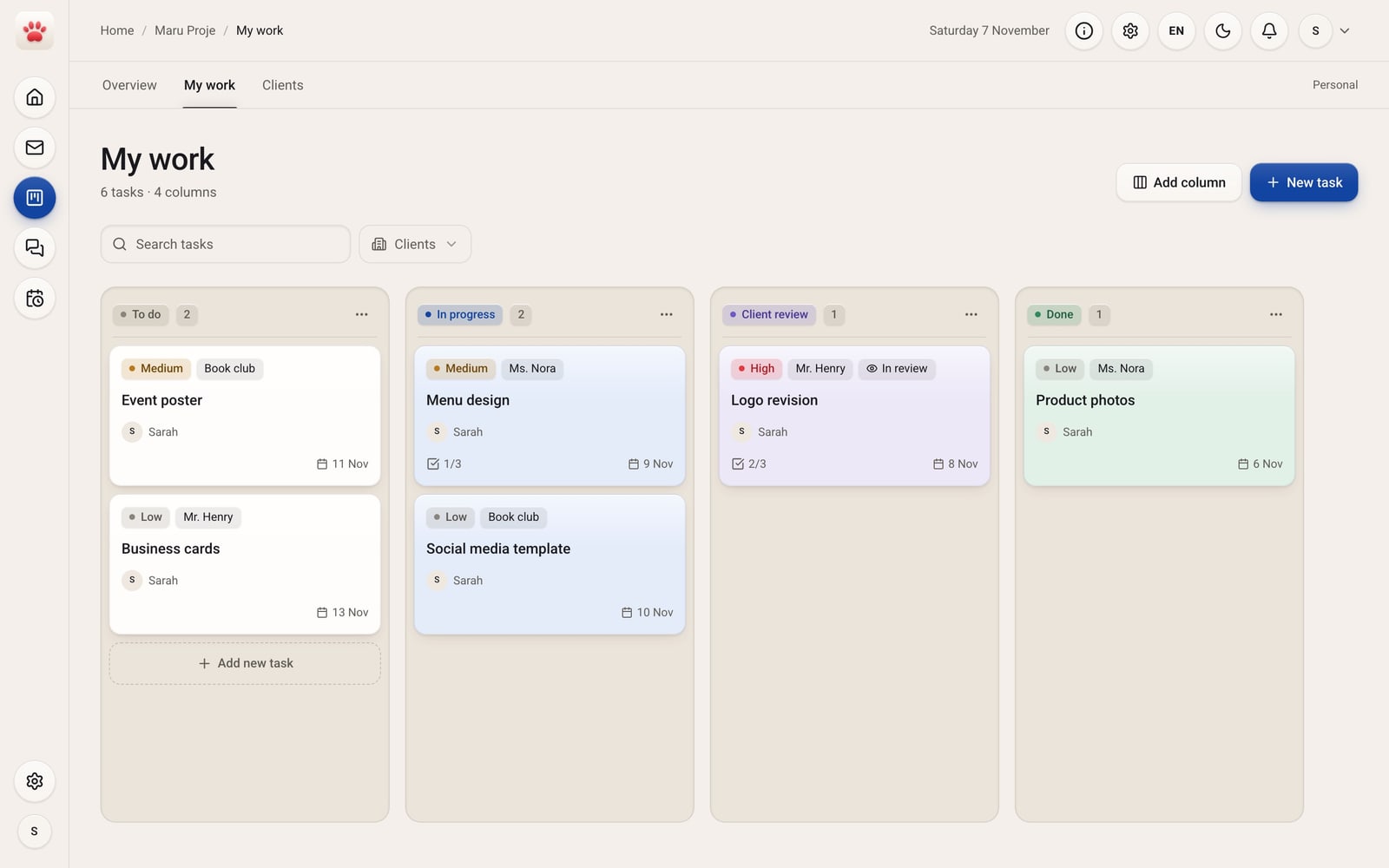
- My work
Starter columns
- To do
- In progress
- Client review
- Done
Only in this edition
- No team setup Invites, roles and the team screen are off; just your work and your clients.
- Client review What’s waiting on each client has its own column.
- Logo and colors A client’s logo and colors sit on their card.
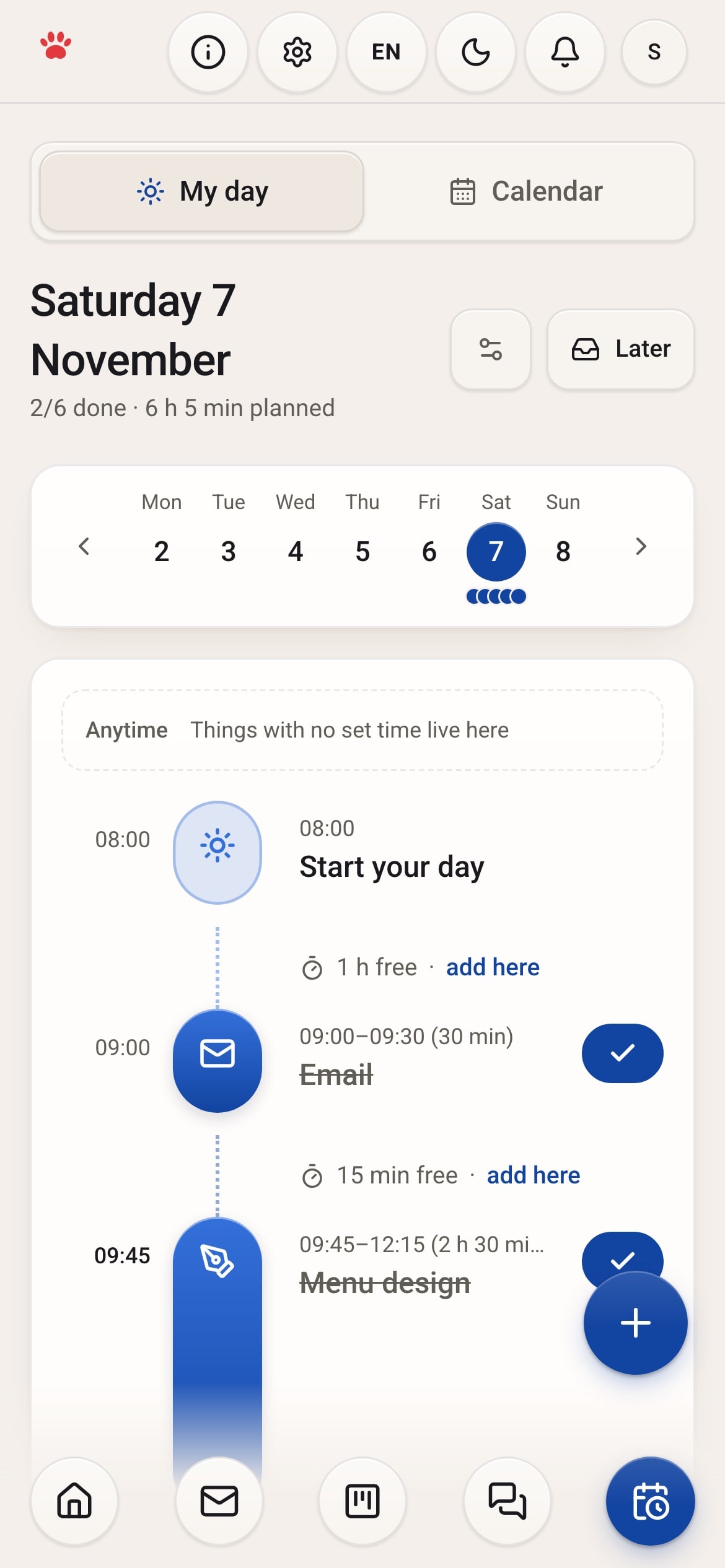
- Maru Plan Your day on a timeline; finish it in Plan and the task moves forward in Proje.
A day with Maru Hub
- 9:00
Sarah checks her email and adds the menu design to her plan.
- 9:45
She blocks two and a half hours for the menu and checks it off in Plan.
- 14:00
She moves the logo revision to Client review.
- 16:30
She sends the invoice and closes her day.
Suggested plan
Personal ₺149/mo
excl. VAT
1 person. Unlimited Proje, Chat and Plan, 10 GB file storage, on all your devices.
Questions
What if I build a team later?
Change your workspace type in Settings. Nothing is deleted, and you can keep your columns.
Can I keep clients in Personal?
Yes. Clients, tasks and client review are all on in this edition.
Run all your work from one place.
Try Maru free for 14 days.
To-dos
- Add your first task
- Invite your team
- Plan your day
Your tasks and messages stay when the trial ends.